top of page
Involve
UX Designer
UX Researcher
My role
Skills Used

A centralized platform built to help MSU students easily find clubs, connect with organizations, view announcements, and stay engaged with campus life.
MSU Clubs Made Discoverable
3 months
Timeline
Tools
UX Design
UX Research
Interaction Design
Figma
FigJam
Google Sheets
Getting Started
Overview
As part of a social design course at Michigan State University (MSU), I collaborated with a team of students to explore how campus clubs operate and the various elements involved in keeping them running effectively.
We discovered that an existing platform lacked the essential information club organizers need to organize and advertise their groups effectively, and the clarity students need to easily find organizations that fit their interests.
Involve is an all-in-one web platform that acts as a hub for MSU e-board members and general students looking to join a club.
Finding Pain Points
User Research
Qualitative Research
To kickstart our discovery process, we made a list of areas we wanted to learn about and created 3 sets of interview questions personalized for the different user groups we planned on interviewing.
E-Board

General Member
Faculty Advisor
Card Sort and Analysis
From the interviews, we created a card sort to get a better understanding of where our user pain points lied.


Through analysis, 2 main challenges emerged:
1 .Clubs were having issues expanding their reach, ultimately affecting their attendance levels.
2. Personal connections and social media platforms were the main and sometimes only point of connection between organizations.
What's the issue?
Our "How Might We" Statement
How might we inform MSU students and organizations about critical information in order to raise participation, and increase communication and awareness within clubs.
A quick preview
Our Solutions
Club page features relevant images of past club events, essential club information, as well as a contact button for organizers to easily collaborate with one another.
Involve Messages allow organization e-board members to more easily contact one another for collaborations.
Inviting Images and Easy Access Contact Button
Messaging Options
Mapping it Out
Hierarchical Task Analysis
After finalizing the pain points we'd focus on, we created a hierarchical task analysis.

We then went on to create a User Task Flow...

Time to start sketching!
Low-Fidelity Wireframes
To kick off our design process, my team began by individually creating 36 low-fidelity wireframes, each outlining our vision for the solution's functionality and key features.


Medium-Fidelity Wireframes
Once we were satisfied with the low-fidelity wireframes, we used Figma to turn our sketches into medium-fidelity wireframes to get a better understanding of the user experience and the information architecture.


High-Fidelity Wireframes
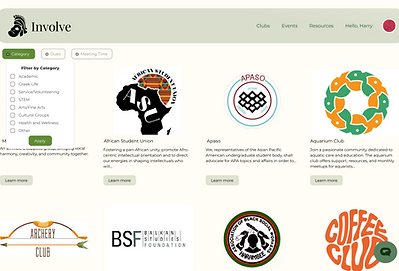
Following the completion of the medium-fidelity wireframes, my team and I felt comfortable jumping into the high-fidelity wireframes.



bottom of page